Article
Assume the agent gets compromised
An autonomous agent with network access is a package-installation engine pointed at the internet. The way to contain it is to assume the machine will be breached, and design so it does not matter.
When an autonomous agent runs on a machine you own, the frightening question is whether the model will “go rogue”. It is the wrong thing to worry about. A model does not have to want anything in particular to do damage: it will install a dependency you would not have chosen, run a build step it cannot read, and paste a URL into a shell — all while doing exactly what it was asked.
The likelier event is duller and better documented. Something you did not write ends up running with the agent’s privileges. An autonomous agent is, structurally, a package-installation engine with a network connection and a mandate to act, and whatever it installs inherits everything the agent holds.
Picture where this usually happens: an ordinary home lab. A NAS that holds your files and runs a handful of services, a spare machine you have pointed an agent at, and a flat home network where every device can reach every other. That is the setup that made self-hosting worth doing in the first place — you own the hardware, the data and the software, and none of it is rented by the month. It is also the setup where an autonomous agent’s blast radius is largest, because the machine that installs things and the machine that keeps your data sit one flat network apart.
Three ordinary paths in
None of these needs a hostile model.
The dependency nobody chose. In 2024 a patient contributor spent roughly two
years earning maintainer trust in the xz-utils project, then used it to slip a
backdoor into liblzma aimed at SSH (CVE-2024-3094). It was caught by accident,
when an engineer noticed that SSH logins had become about half a second slower.
An autonomous agent would have installed it without noticing anything.
The package that exists only because a model imagined it. Code-generating models invent plausible package names. A study of 576,000 generated code samples found that nearly one in five referenced at least one package that does not exist — some 205,000 distinct fabricated names in total — and that the same invented names recur across runs. That recurrence is what makes them worth registering: an attacker publishes a malicious package under a name the models keep suggesting, and the model becomes the delivery mechanism. The model is not the adversary; it is the supply.
You asked it to read the web. An agent searching for the error message it just hit will read the top result. A README that says “to fix this, run …” is a working prompt injection, because the agent is the reader and the installer at the same time. No human is ever socially engineered.
Change the question
If the probable event is “the agent machine is running something hostile”, then “how do I prevent infection?” is the wrong plan — the honest answer is that you cannot audit a modern dependency graph. Nobody can read the transitive closure of a serious project, let alone keep up with it while the agent adds to it.
The useful question is narrower: when it happens, what can the intruder reach, and what can it do? Design so the answer is “almost nothing”. Ranked by leverage:
1. Egress allowlisting — deny the payoff
After a compromise, malicious code wants two things: a channel out, to exfiltrate data or receive instructions, and a view of the network, to spread. A deny-by-default egress policy that admits only what the agent legitimately needs — its package mirrors, the code hosts, and the specific NAS ports — removes both. The code still runs; it simply has nowhere to send anything and nothing to scan. The denied-connection log becomes your detection for free.
2. Credential scoping — the malware inherits what the agent holds
Whatever credential the agent has, the backdoored library now has too. So the agent’s access to the NAS should be a deploy key pinned to named repositories, never an account that can browse shares, read snapshots, or reach the admin UI. Where you can, prefer a proxy that injects credentials into approved requests over putting secrets in an environment any process can read.
3. Backups the agent cannot delete
If write access to the NAS is in scope, the only thing that saves the data is a copy the agent’s credentials physically cannot touch: scheduled snapshots with retention, plus at least one copy that is offline or pull-only — a backup host that pulls from the NAS rather than accepting pushes to it.
4. Disposability — rotation beats inspection
If the agent’s workspace is a virtual machine you can rebuild on a schedule, “what did it install?” stops being a question you have to answer by auditing thousands of packages. You rebuild the environment and the infection ages out. You cannot audit the dependency graph, but you can always cycle it.
Separate what the agent ships from what runs
The single most useful move is to stop treating the agent as an operator and start treating it as a code producer. Split the NAS into two planes that the agent’s permissions keep apart:
- The infrastructure plane — the git server, the image registry, and the pipelines that build and deploy. This is the plane that holds the power to change what actually runs.
- The product and data plane — your files, and the services those pipelines deploy.
The agent gets no permission on infrastructure. It has no shell on the NAS, no Docker socket, no admin UI, no deploy credentials. Its only write path is to push code and artifacts: commits to a repository, and — if you want to skip a rebuild — an image to the registry. Everything else is done by the infrastructure, not by the agent: a pipeline pulls the code, builds the image, runs the tests, and only then deploys. That pipeline is the one thing holding deploy privileges, and it lives in the trusted plane where the agent cannot rewrite it.
The effect is a clean division of labour. The agent proposes; infrastructure disposes. A compromised agent can, at worst, push a bad commit or a bad image — and the pipeline is the choke point where that gets caught: a signature check, a test suite, or a human pressing the button before anything changes what is running. It is the same separation good CI/CD has always made — build in one place, deploy from another — with the agent cast as an untrusted contributor rather than a trusted operator. That one decision removes the Docker-socket problem that otherwise turns every agent into root.
Put every boundary outside the thing you do not trust
Those levers share a property worth naming: each of them is enforced somewhere other than the agent. That is not a coincidence; it is the whole design.
If the agent can run commands on a host, it can, in principle, edit that host’s firewall, rewrite its own resolver, or disable the scanner you placed there to watch it. So enforcement has to live outside the box:
- The coarse boundary is the network. Put the machine on its own segment — a VLAN, or a small VLAN-capable router in front of a mesh system that lacks one — and let the firewall admit only the traffic you intend: the internet, plus a pinhole to the NAS. This stops lateral movement to the rest of your network. It is worth doing, and on its own it is coarse: from the machine’s point of view, either the whole internet is reachable or none of it is.
- The fine boundary is inside the machine but outside the agent. A virtual machine the agent cannot see out of, where the host — not the guest — owns the routing. Policy is set where the agent has no privileges.
You want both, and they are not redundant: the network boundary limits where the box can go; the in-box boundary limits what the agent can do.
A sandbox runtime, a VM, or a microVM?
This is really one question: where do you draw the line, given that the agent must stay free to install tools, run builds, pull and push code, and open a browser?
Start with what each option gives you.
- A container shares the host kernel. Cheap, and the smallest step if the agent is already container-shaped — but a kernel escape is a host escape.
- A microVM (Firecracker, Cloud Hypervisor, and friends) gives the agent its own kernel and userland, with the host enforcing the network edge. Stronger isolation, still one image to rebuild.
- A sandbox runtime such as NVIDIA’s OpenShell instruments the kernel to police every file access, system call and network connection, per process, as it happens.
It is tempting to treat these as a choice between “isolated” and “finely controlled”. They are not, and the reason is specific to how OpenShell is built.
OpenShell splits into a supervisor — trusted, holding the policy — and a sandbox — untrusted, sharing its boundary with the agent. The agent never makes a policy decision: it reports what it is trying to do and the supervisor decides. On Linux, the workload runs as a non-root identity with no capabilities, Landlock confines the filesystem, and seccomp user notification stages network operations so the supervisor can see the calling program — identified from trusted process data, not from a path the agent claims — before a connection goes anywhere. Credentials are placeholders: the agent never holds the real key, and the supervisor adds it only to requests bound for endpoints the policy allows.
The part that settles the question is OpenShell’s VM runtime. In that mode the agent’s guest has no network device at all; the only path out is an authenticated channel to the supervisor running on the host. So “microVM or OpenShell” is a false choice — its VM driver is the microVM, with per-process policy and credential injection layered on top. You get the strong boundary and the fine-grained egress rules together.
That fits the requirement well: freedom to install and build, without that freedom implying a foothold on your network. Two honest caveats.
- It is young. Releases are
0.1.x, and NVIDIA is moving the project into the CNCF. Treat the defaults as needing verification against your own workloads rather than trusting them, and pin versions. - You can get most of the way with less. A plain microVM plus host-level
nftablesrules — allow the package mirrors, the code hosts and the NAS ports; drop everything else, including the private LAN ranges — is more manual, has no magic, and is easy to audit. OpenShell’s value is granularity (per-binary rules, credential injection), not the mere existence of a boundary.
Either way, the browser deserves a note. An agent that “opens pages to fetch information” is reading attacker-controlled text. Fetched content is untrusted input, and the safest posture keeps fetching and installing on opposite sides of a policy decision wherever you can.
On the probe
The tempting addition is a scanner inside the agent’s world, watching for malicious code. Be careful with it.
A probe running inside the sandbox shares a trust domain with the thing it is scanning. Malicious code that lands beside it can, in principle, tamper with the probe, lie to it, or simply hide. That does not make scanning worthless — it makes it monitoring, not a control. It can raise your confidence and catch a lazy intruder, but it cannot be the wall.
If you want detection you can lean on, put the sensor outside the boundary:
- The egress denials are the signal. A denied connection to an unexpected host is the most valuable event you will get, and it is produced by the supervisor, which the agent cannot reach.
- Keep static scanning and provenance checks in CI, on the code you push, where a compromise cannot rewrite the checker that is judging it.
- Treat rotation as the ultimate detection. Rebuild, and anything that did not survive was never yours to keep.
The pattern generalises well past one tool: never let the component being watched own the watch. It is the same reason the firewall does not live on the agent’s host.
A home lab that assumes compromise
Pull the pieces together and a good home lab looks like this.
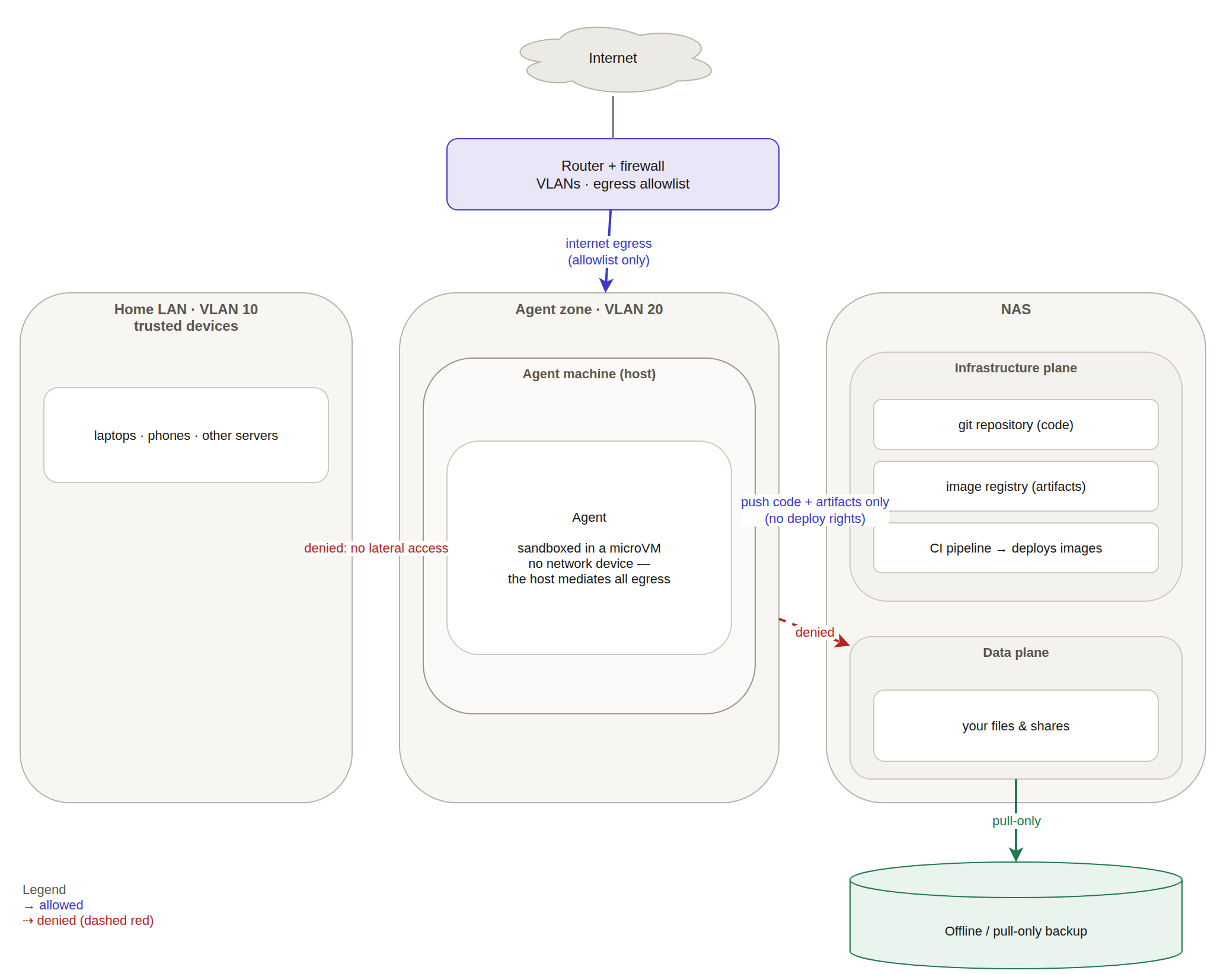
Read it as three permissions, deliberately narrow:
- Out — the agent reaches the internet, but only through an egress allowlist, so a payload has nowhere to call home and nothing else to scan.
- In — the agent may push code and artifacts to infrastructure; it holds no deploy rights, and the pipeline that does hold them is not its to touch.
- Denied — no lateral access to the home LAN, and no access at all to the data plane. The one thing that can read your files is the backup, and it only pulls.
Underneath it all sits the microVM: the agent’s guest has no network device, so even the paths you allow are decisions made on the host, outside the box the agent can reach.
The design is two ideas and a handful of habits.
- Assume compromise. Design for the breach, not for its prevention.
- Put every boundary outside the thing you do not trust. The network segment, the hypervisor, the supervisor, the backup that only pulls.
Egress allowlisting, per-repository credentials, snapshots the agent cannot delete, and a workspace you can rebuild on a schedule are all just that posture, applied. Get the two ideas right and the residual risk lands where you want it: an annoyance you clean up, not an incident you have to survive.
It is, in the end, the oldest idea in self-hosting, applied honestly: run what you own, and know exactly what it is allowed to touch.
Have a system an autonomous agent is reaching into — or are you trying to? soleo.ca does architecture review. hello@soleo.ca
Notes and sources
- CVE-2024-3094, the
xz/liblzmabackdoor, was reported to theoss-securitylist on 29 March 2024: openwall.com/lists/oss-security/2024/03/29/4. - Package hallucinations and their exploitation: Spracklen et al., We Have a Package for You! A Comprehensive Analysis of Package Hallucinations by Code Generating LLMs, USENIX Security 2025 — arXiv:2406.10279.
- OpenShell’s architecture, isolation model and VM runtime: github.com/NVIDIA/OpenShell and docs.nvidia.com/openshell.